Introduction
I tested five current local vision-language models on one NVIDIA RTX 4090 across Ollama and direct llama.cpp, centered on Qwen3.8-27B and Gemma 4 26B A4B. The work covered installation, model downloads, coding-harness configuration, practical text and vision context ceilings, multi-token prediction (MTP), short and filled-context throughput, CPU offload, matched runtime performance, and 360 W versus 450 W GPU power limits.
The two-model daily result is summarized next. The complete setup and all five-model evidence remain below so the conclusions are reproducible.
Update — 2026-08-18: I added runtime reasoning-effort controls for Ollama, OpenCode, and Pi, then reran Qwen3.8-27B and Gemma 4 26B over three fixed seeds. Reasoning effort is a request/chat-template setting, not a different GGUF or quantization: no model conversion, weight download, or alias rebuild is required. The original throughput and context tables remain unchanged because they answer a different question.
Results at a Glance
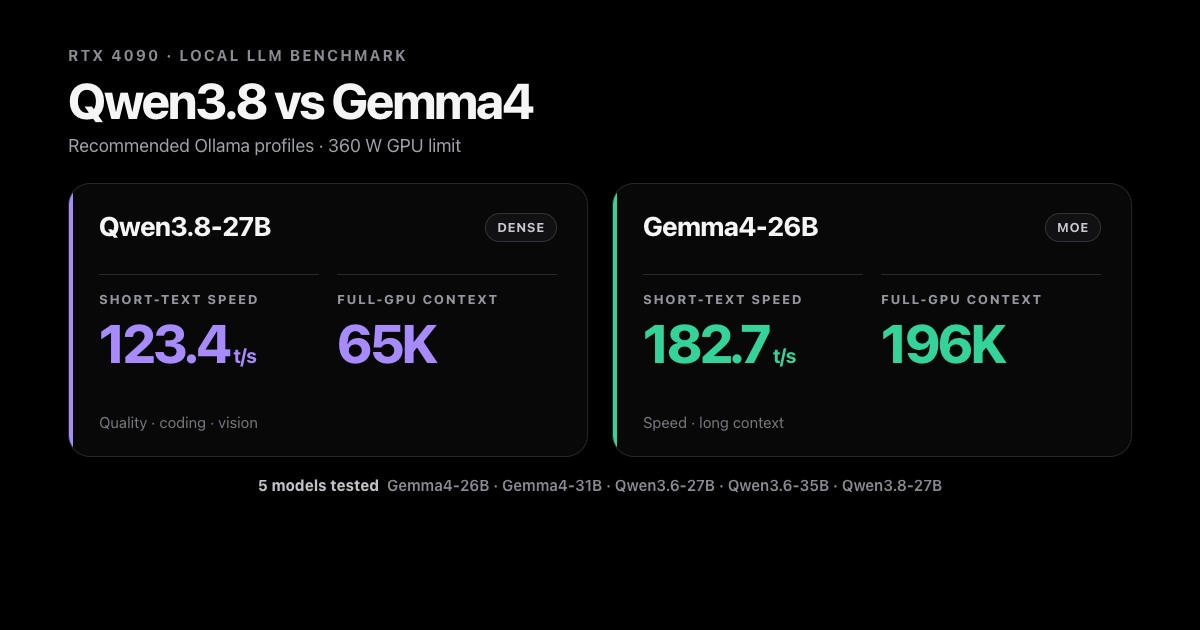
These are the two daily profiles I would keep. Short and filled speeds come from the selected Ollama profile tests, not from the separate SPEED-Bench or GuideLLM workloads.
gemma4:26b— speed and long context: 196,608-token Ollama context; 182.7 t/s short and 97.6 t/s filled; 196,608-token direct llama.cpp text profile. Keep thinking off for routine work and switch it on for selected harder prompts.qwen3.8:27b— coding, agents, reasoning, and vision: 65,536-token Ollama context; 123.4 t/s short and 71.8 t/s filled; 98,304-token direct llama.cpp text profile. Usemediumas the daily harness setting,lowfor short/simple work, andxhighselectively with a larger completion budget.
The guide is arranged in two layers: the daily setup comes first, followed by the complete benchmark methodology, runtime results, model profiles, and power-limit verification.
Test Setup and Scope
RTX 4090 Hardware
All results in this guide were measured on this machine. Unless a table says otherwise, the RTX 4090 was limited to 360 W.
| Component | Hardware |
|---|---|
| OS | Ubuntu 26.04 LTS, Linux 7.0.0-28-generic |
| CPU | AMD Ryzen 9 3900X, 12 physical cores / 24 threads |
| RAM | 32 GB installed (free -h reports 31 GiB) |
| GPU | NVIDIA GeForce RTX 4090, 24,564 MiB VRAM |
| GPU power | 360 W tested; NVIDIA default 450 W; board maximum 600 W |
| NVIDIA driver | 595.84 |
| Model/data root | ~/dev/ml-data |
The 24 GB GPU is the main constraint. Full GPU residency is fast; partial CPU offload can cause a severe decode-speed cliff, as Gemma 4 31B demonstrates in the Ollama 65K benchmark.
Five Local Models Tested
These five models are retained in both runtimes and sorted by name. The reported context is the model’s architectural window, not a promise that the model, projector, MTP state, and KV cache fit in 24 GB VRAM at that size.
| Model | Parameters | Type | Reported context | Capabilities | Ollama package | llama.cpp package |
|---|---|---|---|---|---|---|
gemma4:26b | 25.2B, about 3.8B active | MoE | 262,144 | text, vision, tools, thinking | Q4_K_M | Unsloth UD-Q4_K_XL |
gemma4:31b | 30.7B | dense | 262,144 | text, vision, tools, thinking | Q4_K_M | Unsloth UD-Q4_K_XL |
qwen3.6:27b | 27B | dense | 262,144 | text, vision, tools, thinking | Q4_K_M | Unsloth UD-Q4_K_XL |
qwen3.6:35b | 35B, about 3B active | MoE | 262,144 | text, vision, tools, thinking | Q4_K_M | Unsloth UD-Q4_K_XL |
qwen3.8:27b | 27B | dense | 262,144 | text, vision, tools, thinking | Q4_K_M | Unsloth UD-Q4_K_XL |
Model type, parameter counts, context, and capabilities were checked against the current Unsloth model cards/guides and the corresponding Ollama package metadata. The actual llama.cpp request ceilings are measured later in this guide.
Daily Setup
This section contains the two recommended models, practical context limits, reusable Ollama profiles, and coding-harness configuration. The full five-model evidence begins in Benchmark Methodology.
Qwen3.8-27B vs Gemma 4 26B: Recommended Models
Recommendation — Two base models are enough: Use
gemma4:26bfor fast, long-context work andqwen3.8:27bfor the highest-quality dense local model. Keep the other three models only as benchmark references or for targeted experiments.
Only these two base downloads are required for normal use:
ollama pull gemma4:26b
ollama pull qwen3.8:27b
Context and Vision
The same base tag handles both text and images. Vision does not require another weight download or a special vision tag: both packages already include their multimodal support. Most daily use is through a coding harness, so use fixed aliases rather than relying on a harness to send Ollama-native request options.
Filled requests established the useful full-GPU boundary and the first CPU-offloaded point. Vision used the fixed real image, not merely a loaded projector.
| Model | Text: max 100% GPU | Text: first offload | Vision: max 100% GPU | Vision: first offload |
|---|---|---|---|---|
gemma4:26b | 196,608 | 229,376 (92% GPU) | 196,608 | 229,376 (92% GPU) |
qwen3.8:27b | 65,536 | 98,304 (81% GPU) | 65,536 | 98,304 (81% GPU) |
“100% GPU” means the model and allocated KV cache are fully GPU-resident, not that the context is always full or that tokens/s is maximal. Gemma also completed 262,144-token text and vision requests at 89% GPU, but those are academic capacity results: CPU offload is slower, so use 196K. Qwen’s offload penalty is much steeper, so use 65K in Ollama; direct llama.cpp reaches a larger useful window with q8 K/V.
Set num_ctx explicitly. Current Ollama chooses only 4K below 24 GiB VRAM, 32K from 24-48 GiB, and 256K at 48 GiB or more. The RTX 4090 reports 24,564 MiB—approximately 23.99 GiB—so it sits directly on the lower threshold and should not rely on automatic context selection.
For an image through the CLI, use the same model name:
ollama run qwen3.8:27b ./image.png "Describe this image accurately."
ollama run gemma4:26b ./image.png "Describe this image accurately."
The native /api/chat API accepts base64 image data in messages[].images and accepts num_ctx under options. The OpenAI-compatible API used by OpenCode and Pi supports vision and tools but has no per-request context-size field, so its model name must point to an alias with the intended num_ctx. See Configure Context and MTP for native API diagnostics and service-wide configuration.
Harness-Safe Ollama Profiles
Create these once. They inherit the base blobs and do not download the weights again.
# Modelfile.gemma26
FROM gemma4:26b
PARAMETER num_ctx 196608
# Modelfile.qwen38
FROM qwen3.8:27b
PARAMETER num_ctx 65536
PARAMETER draft_num_predict 4
ollama create gemma4-26b-196k -f Modelfile.gemma26
ollama create qwen3.8-27b-65k -f Modelfile.qwen38
Each alias supports both text and images, so only two profiles are needed. They reuse the base blobs instead of downloading weights again. Do not add draft_num_predict to Gemma: its stock package does not enable embedded MTP.
Reasoning effort is deliberately absent from these Modelfiles. The aliases pin context and Qwen’s MTP depth; reasoning_effort is sent per request, so OpenCode, Pi, or curl can switch it at runtime without recreating the model. With Ollama 0.32.13, Qwen3.8 has three effective enabled levels: low, medium, and xhigh. An omitted effort uses Qwen’s xhigh default; Ollama also maps OpenAI high, max, and xhigh onto Qwen’s xhigh behavior. Gemma’s renderer exposes the simpler thinking-off/thinking-on choice.
Coding Harnesses
Use Ollama for normal harness work. It manages the two large models and exposes a stable OpenAI-compatible endpoint. Use direct llama.cpp when a harness needs the measured long-context vision profile or exact control over the quant, MTP, KV cache, and server flags.
Important — One active large model: Do not assign a different large model as a harness’s background or
small_model: both models cannot remain resident together on this 24 GB GPU. Model switching would repeatedly unload and reload weights. Keep harness concurrency at one; the direct launcher has one slot, while parallel Ollama requests multiply KV-cache memory.
These launchers and direct-provider settings were checked against current upstream documentation and the installed CLIs on 2026-08-18. OpenCode 1.18.18 and Pi 0.84.2 are installed. After starting a harness, require one tool call and one image smoke test before relying on it.
OpenCode with Ollama
Ollama can install and configure OpenCode, select a local model, and launch the session without changing OpenCode’s persistent configuration:
ollama launch opencode
ollama launch opencode --model qwen3.8-27b-65k
ollama launch opencode --model gemma4-26b-196k
Use qwen3.8-27b-65k for difficult coding or gemma4-26b-196k for speed and longer context. ollama launch opencode --config prepares the integration without opening a session. The launcher passes an inline provider configuration and does not overwrite ~/.config/opencode/opencode.json.
For runtime effort switching, persist custom variants under provider.ollama.models in ~/.config/opencode/opencode.json. This is the relevant fragment:
Show OpenCode Ollama effort variants
{
  "qwen3.8-27b-65k": {
    "name": "Qwen3.8 27B — Ollama 64K",
    "reasoning": true,
    "attachment": true,
    "limit": { "context": 65536, "output": 16384 },
    "variants": {
      "low": { "reasoningEffort": "low" },
      "medium": { "reasoningEffort": "medium" },
      "xhigh": { "reasoningEffort": "xhigh" }
    }
  },
  "gemma4-26b-196k": {
    "name": "Gemma 4 26B — Ollama 192K",
    "reasoning": true,
    "attachment": true,
    "limit": { "context": 196608, "output": 8192 },
    "variants": {
      "off": { "reasoningEffort": "none" },
      "on": { "reasoningEffort": "medium" }
    }
  }
}
Launch the model, then press Ctrl+T to cycle its variants:
opencode -m ollama/qwen3.8-27b-65k
OpenCode’s installed interactive command has no top-level --variant option. Ctrl+T is the verified runtime selector; without a selected variant, Ollama leaves Qwen at its model default, which is xhigh in 0.32.13.
Pi with Ollama
Ollama provides the equivalent supported launcher for Pi. It installs Pi if necessary, configures Ollama as a provider, manages the Ollama web-search package, and opens a session:
ollama launch pi
ollama launch pi --model qwen3.8-27b-65k
ollama launch pi --model gemma4-26b-196k
Use ollama launch pi --config to configure the integration without starting an interactive session. A manual ~/.pi/agent/models.json is only necessary when Pi must connect to a non-Ollama endpoint or override the launcher’s generated metadata.
To expose only the effort levels these models actually support, merge the following provider into ~/.pi/agent/models.json:
Show Pi Ollama effort configuration
{
  "providers": {
    "ollama": {
      "baseUrl": "http://127.0.0.1:11434/v1",
      "api": "openai-completions",
      "apiKey": "ollama",
      "compat": {
        "supportsDeveloperRole": false,
        "supportsReasoningEffort": true
      },
      "models": [
        {
          "id": "qwen3.8-27b-65k",
          "name": "Qwen3.8 27B — Ollama 64K",
          "reasoning": true,
          "thinkingLevelMap": {
            "off": "none",
            "minimal": null,
            "low": "low",
            "medium": "medium",
            "high": null,
            "xhigh": "xhigh",
            "max": null
          },
          "input": ["text", "image"],
          "contextWindow": 65536,
          "maxTokens": 16384
        },
        {
          "id": "gemma4-26b-196k",
          "name": "Gemma 4 26B — Ollama 192K",
          "reasoning": true,
          "thinkingLevelMap": {
            "off": "none",
            "minimal": null,
            "low": null,
            "medium": "medium",
            "high": null,
            "xhigh": null,
            "max": null
          },
          "input": ["text", "image"],
          "contextWindow": 196608,
          "maxTokens": 8192
        }
      ]
    }
  }
}
Pi can set the initial level on the command line and switch it during the same session with Shift+Tab:
pi --provider ollama --model qwen3.8-27b-65k --thinking medium
pi --provider ollama --model gemma4-26b-196k --thinking off
Pi also accepts model shorthand such as --model ollama/qwen3.8-27b-65k:medium. The effort changes the next request; it does not reload weights or change the 65K/196K context allocation.
Harnesses with Direct llama.cpp
For a harness session that bypasses Ollama, start one of the verified vision-mode llama-server commands in Standard Model Profiles. The resulting OpenAI-compatible endpoint is http://127.0.0.1:8080/v1. Run one server at a time; the measured daily vision allocations are 65,536 for Qwen3.8 and 163,840 for Gemma 4 26B.
OpenCode provider block: Pi can use the same single-model endpoint by adding this provider beside Run the harness with the alias matching the server that is currently active: The tested llama.cpp build accepts top-level Pi also supports llama.cpp’s multi-model router through Show the complete OpenCode and Pi llama.cpp configuration
{
  "$schema": "https://opencode.ai/config.json",
  "provider": {
    "llama-cpp": {
      "npm": "@ai-sdk/openai-compatible",
      "name": "llama.cpp tuned local server",
      "options": { "baseURL": "http://127.0.0.1:8080/v1" },
      "models": {
        "gemma4-26b": {
          "name": "Gemma4 26B — llama.cpp vision 160K",
          "attachment": true,
          "reasoning": true,
          "tool_call": true,
          "limit": { "context": 163840, "output": 8192 },
          "modalities": { "input": ["text", "image"], "output": ["text"] },
          "variants": {
            "off": { "reasoningEffort": "none" },
            "on": { "reasoningEffort": "medium" }
          }
        },
        "qwen3.8-27b": {
          "name": "Qwen3.8 27B — llama.cpp vision 64K",
          "attachment": true,
          "reasoning": true,
          "tool_call": true,
          "limit": { "context": 65536, "output": 16384 },
          "modalities": { "input": ["text", "image"], "output": ["text"] },
          "variants": {
            "low": { "reasoningEffort": "low" },
            "medium": { "reasoningEffort": "medium" },
            "xhigh": { "reasoningEffort": "xhigh" }
          }
        }
      }
    }
  }
}
ollama in models.json:"llama-local": {
"baseUrl": "http://127.0.0.1:8080/v1",
"api": "openai-completions",
"apiKey": "local",
"compat": {
"supportsDeveloperRole": false,
"supportsReasoningEffort": true
},
"models": [
{
"id": "gemma4-26b",
"reasoning": true,
"thinkingLevelMap": {
"off": "none",
"minimal": null,
"low": null,
"medium": "medium",
"high": null,
"xhigh": null,
"max": null
},
"input": ["text", "image"],
"contextWindow": 163840,
"maxTokens": 8192
},
{
"id": "qwen3.8-27b",
"reasoning": true,
"thinkingLevelMap": {
"off": "none",
"minimal": null,
"low": "low",
"medium": "medium",
"high": null,
"xhigh": "xhigh",
"max": null
},
"input": ["text", "image"],
"contextWindow": 65536,
"maxTokens": 16384
}
]
}
opencode -m llama-cpp/qwen3.8-27b
pi --provider llama-local --model qwen3.8-27b
reasoning_effort on /v1/chat/completions, so the same controls work here: OpenCode uses Ctrl+T, while Pi accepts --thinking medium at launch and Shift+Tab during the session. Its server also exposes --reasoning-effort LEVEL for a fixed server-wide default. Keep the 16K Qwen output ceiling if xhigh is selectable; it is completion headroom inside the 65K total context, not a larger context allocation./login llama.cpp and /llama. That is a separate workflow: start llama-server without -m, --model, or -hf, point it at a --models-dir, and reproduce the measured per-model settings as llama.cpp presets.
After starting a harness session, use the check for its runtime:
# Ollama
ollama ps

# Direct llama.cpp
curl http://127.0.0.1:8080/health
For a smoke test, require one real tool call; for a vision profile, attach a known test image and verify both a complete answer and full-GPU residency. A successful chat alone does not prove that tool schemas or images reached the model.
Benchmark Methodology
From here, the guide switches from daily configuration to the full benchmark record. Run long GPU jobs sequentially in tmux; never run two model servers or benchmarks at the same time. Different tools answer different questions, so their tokens-per-second values should not be mixed into one ranking.
| Tool or workload | What it measures |
|---|---|
ollama-bench | Native Ollama prefill, generation, time to first token, load time, and total request time at fixed context allocations. |
| Native filled-context requests | Practical text and real-image context ceilings, the first CPU-offloaded configuration, and slowdown when attention processes a long history. |
| GuideLLM API matrix | Portable OpenAI-compatible throughput and latency with the same prompts, output limits, concurrency, and image. |
| Fixed-seed effort sweep | Runtime cost and completion behavior across Qwen low/medium/xhigh and Gemma thinking off/on. |
| Pelican SVG probe | A deliberately difficult visual/code-generation prompt, checked for XML validity and inspected after rendering. |
| llama.cpp SPEED-Bench | MTP-off baselines, draft-depth sweeps, accepted drafts, and the best model-specific MTP depth. |
| Matched backend A/B | Ollama-bundled versus direct llama-server using the exact same GGUF, precision, flags, prompt, and output work. |
The exact installation and benchmark commands appear in the Ollama and llama.cpp sections below. Raw request, server, GPU-placement, reasoning-effort, and SVG artifacts were retained for validation but are not required to follow the public guide. The effort sweep is not mixed into the throughput ranking: changing effort mainly changes how much output is spent reasoning, total latency, and whether the final answer fits.
Ollama Setup and Benchmarks
Ollama is the convenient model manager and daily runtime. Current Ollama serves GGML models through its bundled upstream llama-server, including embedded MTP support.
Install and Update
Use the official Linux installer:
curl -fsSL https://ollama.com/install.sh | sh
ollama --version
The installed inference runtime used here is:
ollama version 0.32.13
An update alias may be kept in ~/.zshrc:
alias ollama-update='curl -fsSL https://ollama.com/install.sh | sh'
After updating, run ollama --version, pull the models again, and rerun the benchmark rather than assuming backend behavior is unchanged.
Configure Context and MTP
For one native API request, set num_ctx explicitly:
curl http://127.0.0.1:11434/api/generate -d '{
  "model": "qwen3.8:27b",
  "prompt": "Say hi.",
  "options": { "num_ctx": 65536 }
}'
For a service-wide Linux default:
sudo systemctl edit ollama.service
[Service]
Environment="OLLAMA_CONTEXT_LENGTH=65536"
sudo systemctl daemon-reload
sudo systemctl restart ollama
For a persistent per-model profile, export its Modelfile, set PARAMETER num_ctx 65536, and create a new name:
ollama show qwen3.8:27b --modelfile > Modelfile
ollama create qwen3.8-27b-65k -f ./Modelfile
draft_num_predict controls embedded MTP for models that support it. Keep this parameter model-specific and benchmark it; a larger number is not automatically faster.
PARAMETER draft_num_predict 4
Inspect the effective state instead of relying only on the Modelfile:
ollama show qwen3.8:27b --modelfile
ollama ps
journalctl -u ollama.service -n 200 --no-pager | grep 'starting llama-server'
The journal exposes the actual context, parallel slots, batch sizes, projector, Flash Attention mode, MTP flags, and backend command. ollama ps confirms effective context and CPU/GPU placement.
Install ollama-bench
Build the benchmark from the current Ollama source tree:
mkdir -p ~/dev/projects
cd ~/dev/projects
git clone https://github.com/ollama/ollama.git
cd ollama
go build -o ollama-bench ./cmd/bench
./ollama-bench -h
Update an existing checkout with:
cd ~/dev/projects/ollama
git pull --ff-only
go build -o ollama-bench ./cmd/bench
Versions used for the saved results:
| Component | Version |
|---|---|
| Ollama inference runtime | 0.32.13 |
Ollama source / ollama-bench commit | e5a81899d014a847a08d47393351908b53d74008 |
| Go module | v0.32.14-0.20260815020320-e5a81899d014 |
| Go | 1.26.5 |
| Bundled llama-server backend | commit 0b1bad14f, GCC 13.3.1 |
Pull the Five Models
ollama pull updates an existing tag if its manifest or blobs changed:
ollama pull gemma4:26b
ollama pull gemma4:31b
ollama pull qwen3.6:27b
ollama pull qwen3.6:35b
ollama pull qwen3.8:27b
All five stock packages used Q4_K_M weights. Do not describe a stock-package comparison as a pure runtime comparison with Unsloth UD-Q4_K_XL files.
Native Text Benchmark
The current benchmark was run at both 16,384 and 65,536 context, six timed epochs after one warmup, with a 200-token generation cap:
~/dev/projects/ollama/ollama-bench \
  -model gemma4:26b,gemma4:31b,qwen3.6:27b,qwen3.6:35b,qwen3.8:27b \
  -epochs 6 \
  -num-ctx 65536 \
  | tee ollama-five-models-65k.bench
| Model | 16K generate | 16K prefill | 65K generate | 65K prefill | 65K TTFT |
|---|---|---|---|---|---|
gemma4:26b | 183.8 t/s | 1,901.6 t/s | 182.7 t/s | 1,888.5 t/s | 0.744 s |
gemma4:31b | 43.6 t/s | 800.6 t/s | 9.6 t/s | 143.1 t/s | 1.336 s |
qwen3.6:27b | 45.4 t/s | 418.2 t/s | 45.3 t/s | 409.8 t/s | 0.789 s |
qwen3.6:35b | 94.9 t/s | 564.5 t/s | 80.2 t/s | 464.8 t/s | 0.684 s |
qwen3.8:27b | 91.1 t/s | 379.2 t/s | 90.9 t/s | 371.8 t/s | 0.739 s |
Gemma 4 31B crosses a CPU-offload cliff at 65K. This is a capacity result, not an Ollama API failure.
Controlled Ollama API Results
The common API matrix used one request at a time, six requests, a 65K text allocation, a 16K vision allocation, a 256-token throughput cap, and a separate 2,048-token answer-completeness pass. Its short prompts do not constitute a filled-context ceiling test. The table reports GuideLLM output throughput.
| Model | Text 65K | Vision 16K | Vision semantic check |
|---|---|---|---|
gemma4:26b | 132.6 t/s | 114.7 t/s | added a nonexistent Sliding Window node |
gemma4:31b | 9.3 t/s | 33.9 t/s | added a nonexistent Sliding Window node |
qwen3.6:27b | 44.4 t/s | 38.1 t/s | correct |
qwen3.6:35b | 81.4 t/s | 37.4 t/s | correct; non-thinking profile |
qwen3.8:27b | 90.8 t/s | 56.0 t/s | correct |
Gemma image prompts encoded about 308 image tokens while Qwen encoded about 3,434. Vision prefill throughput is therefore not comparable across families; use end-to-end latency and answer correctness.
Reasoning-Effort Update: Three Fixed Seeds
On 2026-08-18, I ran a separate quality-oriented sweep through Ollama’s OpenAI-compatible /v1/chat/completions endpoint. It used the two daily aliases, seeds 17/42/73, one request at a time, the model-card sampling profiles, and five fixed coding prompts covering generation, algorithms, debugging, refactoring, and explanation. Every response had an 8,192-token completion ceiling. Qwen used MTP 4; Ollama’s OpenAI response does not expose the draft counters, so the table reports completion usage and wall time rather than claiming MTP acceptance.
Values are means across the three seeds. Completion tokens and wall time are totals for each five-prompt run; “reasoning share” is the share of returned reasoning-plus-answer characters contained in the reasoning field.
| Model/profile | Completion tokens | Five-prompt wall time | Reasoning share | Capped/empty responses |
|---|---|---|---|---|
| Gemma thinking off | 4,064 | 25.9 s | 0.0% | 0/15 |
| Gemma thinking on | 8,495 | 51.1 s | 45.9% | 0/15 |
Qwen low | 4,855 | 50.6 s | 41.8% | 0/15 |
Qwen medium | 6,188 | 64.3 s | 43.8% | 0/15 |
Qwen xhigh | 11,909 | 140.6 s | 66.0% | 1/15 |
This is why I recommend Qwen medium for daily harness work. It completed all 15 responses, while xhigh used about 1.9× as many completion tokens and 2.2× as much wall time as medium; one seed spent the full 8K budget on a refactor without returning a final answer. Raising only that capped case to 16K recovered a correct answer at 9,593 completion tokens and 113.14 seconds, but 94.7% of its reasoning-plus-answer characters were reasoning. The 65K model context made that rescue possible, but context capacity and per-response output caps remain separate controls.
Gemma’s thinking-on profile roughly doubled both completion tokens and elapsed time here. That does not prove thinking is worse or better: this five-prompt suite was not automatically scored. It does show why thinking should be selected per task instead of silently enabled for every short coding request.
Pelican SVG Probe
I also added Simon Willison’s intentionally difficult prompt, Generate an SVG of a pelican riding a bicycle. Each profile ran at the same three seeds and 8K cap. I extracted the final <svg>, checked it with xmllint, rendered it with ImageMagick, and then inspected whether the result showed a recognizable pelican riding a recognizable bicycle.
| Profile | XML-valid SVG | Recognizable riding composition | Capped/empty |
|---|---|---|---|
Qwen low | 3/3 | 2/3 | 0/3 |
Qwen medium | 3/3 | 1/3 | 0/3 |
Qwen xhigh, 8K | 0/3 | 0/3 | 3/3 |
| Gemma thinking off | 1/3 | 0/3 | 0/3 |
| Gemma thinking on | 2/3 | 0/3 | 0/3 |
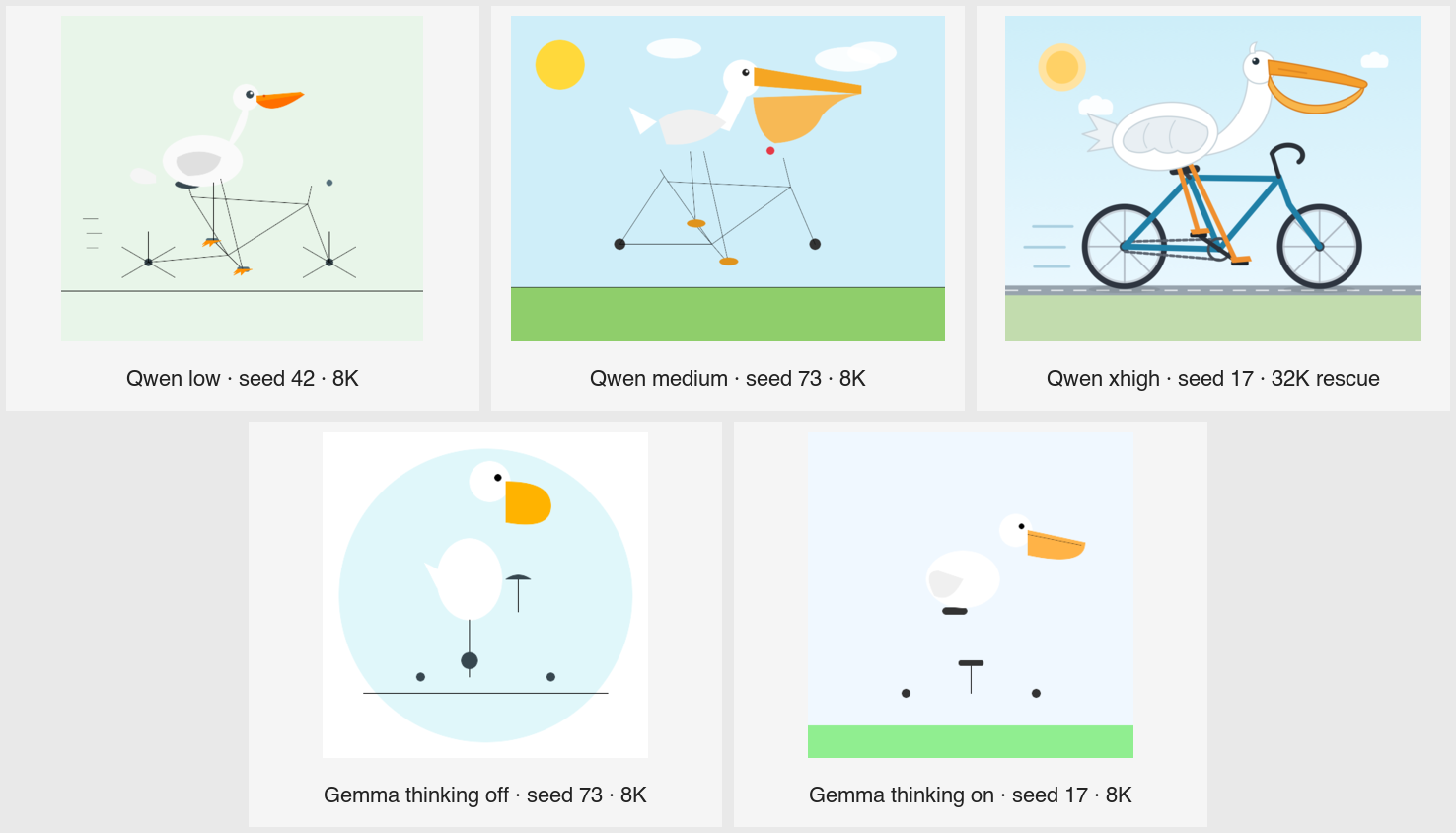
The image selects one XML-valid output from every profile. The Qwen xhigh tile is explicitly labeled as a targeted 32K rescue and is not part of the 8K aggregate above. The original seed-17 run returned reasoning only at 8K, and all three exact-seed retries did the same at 16K. At a 32,768-token cap, seed 17 finally stopped normally with a valid, recognizable SVG after 30,312 completion tokens and 319.05 seconds; 90.2% of its returned reasoning-plus-answer characters were reasoning.
That behavior is consistent with both the model controls and early user reports. Qwen describes xhigh as the default mode for complex tasks, while medium balances accuracy and speed and low prioritizes efficiency. A separate three-seed community run of the Pelican task reported an average of 39,398 reasoning tokens at xhigh, versus 4,418 at low and 5,918 at medium, with better visual quality but roughly 6–7× the wall time. I could not find a Qwen3.8-27B technical or system report that specifies a fixed token budget for these tiers; the public contract is qualitative. This one prompt is therefore a useful stress test, not a general model-quality leaderboard: xhigh can produce the strongest composition, but only if the completion budget has enough headroom for its long deliberation.
Daily-Profile Speed at Short and Filled Context
These native-API checks used the selected shared text/vision profiles. Short columns are medians of three 256-token samples; filled requests used 195,584 prompt tokens for Gemma and 64,512 for Qwen.
| Model | Context | Short text | Short vision | Filled text | Filled vision |
|---|---|---|---|---|---|
gemma4:26b | 196,608 | 182.7 t/s | 180.7 t/s | 97.6 t/s | 96.7 t/s |
qwen3.8:27b | 65,536 | 123.4 t/s | 110.0 t/s | 71.8 t/s | 72.2 t/s |
Configured context alone does not cause the slowdown; attention over an actually long prompt does. Filled latency was about 46–48 seconds for Gemma and 33–37 seconds for Qwen. The Qwen filled-text sample stopped after 22 tokens, while filled vision produced 196, so treat 71.8 t/s as directional; the close vision result supports it.
Build, Configure, and Benchmark llama.cpp
Pull and Build
mkdir -p ~/dev/projects
cd ~/dev/projects
git clone https://github.com/ggml-org/llama.cpp.git
cd llama.cpp
For an existing checkout:
cd ~/dev/projects/llama.cpp
git pull --ff-only
Build for the RTX 4090’s Ada compute capability 8.9:
sudo apt install build-essential cmake libcurl4-openssl-dev libssl-dev

cmake -B build \
  -DGGML_CUDA=ON \
  -DCMAKE_BUILD_TYPE=Release \
  -DCMAKE_CUDA_ARCHITECTURES=89 \
  -DGGML_CUDA_FA_ALL_QUANTS=ON \
  -DLLAMA_OPENSSL=ON

cmake --build build -j8
Build parallelism warning: Use
-j8on this 12-core/24-thread, 32 GB machine.nprocreturns24; that many concurrent CUDA compiler jobs exhausted RAM and made the machine temporarily unresponsive.-j8was the fastest stable choice measured here.
Tested build:
version: 0.1.0-dev (build 10448, commit ad1de39e0708e3ced9c71bb3c82d93a2c046a73f)
built with GNU 15.2.0 for Linux x86_64
Set the Model Cache Once
Set LLAMA_CACHE before all llama.cpp -hf commands, or put the export in ~/.zshrc once:
export LLAMA_CACHE="${LLAMA_CACHE:-$HOME/dev/ml-data/huggingface/models/llama-cache}"
mkdir -p "$LLAMA_CACHE"
export LLAMA_SERVER="$HOME/dev/projects/llama.cpp/build/bin/llama-server"
The five Unsloth repositories were resolved again before testing; -hf downloads missing or updated blobs into this cache.
Common Server Configuration
The commands below share the same base flags. Per-model sections select the repository, context, MTP depth, reasoning mode, and sampling values.
| Option | Meaning |
|---|---|
-hf <repo>:UD-Q4_K_XL | Use the current Unsloth 4-bit Dynamic GGUF and its matching projector metadata. |
--jinja | Pin the Jinja chat-template engine used for harness tool calling. The tested server currently defaults to enabled, but the commands make it explicit. |
-ngl 99 | Request full GPU layer offload. |
-c <tokens> | Allocate the measured mode-specific context. |
-fa on | Enable Flash Attention. |
-np 1 | Use one slot for reproducible VRAM and latency tests. |
-ctk q8_0 -ctv q8_0 | Use q8 K/V cache to save VRAM relative to f16. |
--spec-type draft-mtp | Enable embedded multi-token prediction. |
--spec-draft-n-max N | Maximum speculative draft depth selected by benchmarking. |
--no-mmproj | Text-only: do not load the multimodal projector. |
omit --no-mmproj | Vision: load the matching projector and accept image input. |
--reasoning on/off | Select thinking or non-thinking profile explicitly. |
--reasoning-effort <level> | Set a server-wide effort default; current /v1/chat/completions requests can override it with reasoning_effort. |
Text and vision are separate configurations. A successful projector load is not enough: the ceiling tests sent the fixed image and required a completed response. The projector and image tokens consume VRAM, so vision ceilings are usually lower.
Leave -b and -ub at their defaults for these direct profiles. A 2,048/2,048 Qwen trial improved prefill only about 1.7%, reduced decode speed, and consumed about 1 GiB more VRAM; 4,096 overflowed.
What MTP Does
MTP predicts several future tokens, verifies them against the target path, accepts matching drafts, and rejects the rest. Accepted drafts reduce the number of serial decode steps, so MTP can substantially increase generation speed.
MTP does not increase context length. It adds draft state and GPU work, so a depth that is too high can reduce speed or lower the context ceiling. The useful measurement is accepted drafts plus end-to-end speed, not merely whether the server accepts the flag.
Verify the current build and a live run:
~/dev/projects/llama.cpp/build/bin/llama-server --help | grep spec-type
The server log must show creation of the MTP draft context; completed requests must report non-zero draft generation/acceptance counters.
Request Context Ceilings
These are completed-request ceilings using UD-Q4_K_XL, q8 K/V, the selected MTP profile, and an actual image in vision mode. “Daily” leaves practical headroom; “max pass” is the largest tested successful request.
| Model | Text daily | Text max pass | First text fail | Vision daily | Vision max pass | First vision fail |
|---|---|---|---|---|---|---|
| Gemma 4 26B | 196,608 | 262,144 | native limit reached | 163,840 | 229,376 | 262,144 |
| Gemma 4 31B | 49,152 | 65,536 | 98,304 | 16,384 | 32,768 | 49,152 |
| Qwen3.6-27B | 98,304 | 131,072 | 163,840 | 65,536 | 98,304 | 131,072 |
| Qwen3.6-35B | 65,536 | 65,536 | 98,304 | 16,384 | 49,152 | 65,536 |
| Qwen3.8-27B | 98,304 | 131,072 | 163,840 | 65,536 | 98,304 | 131,072 |
Qwen3.6-35B vision uses non-thinking mode with MTP disabled. Its 65K request failed after loading, which is why 16K—not 49K—is the conservative daily profile. None of the five models is rejected; each has a different useful capacity/performance envelope.
MTP Selection with SPEED-Bench
The final text depths were selected with llama.cpp SPEED-Bench at each model’s daily context.
| Model | Context | MTP off | Selected MTP | Selected speed | Acceptance | Speedup |
|---|---|---|---|---|---|---|
| Gemma 4 26B | 196,608 | 144.81 t/s | 6 | 267.44 t/s | 61.44% | 1.85× |
| Gemma 4 31B | 49,152 | 40.86 t/s | 4 | 110.59 t/s | 74.50% | 2.71× |
| Qwen3.6-27B | 98,304 | 46.01 t/s | 4 | 103.63 t/s | 65.84% | 2.25× |
| Qwen3.6-35B | 65,536 | 168.71 t/s | 3 | 236.04 t/s | 70.47% | 1.40× |
| Qwen3.8-27B | 98,304 | 45.45 t/s | 4 | 77.48 t/s | 39.62% | 1.70× |
These are SPEED-Bench coding-workload numbers, not the same workload as ollama-bench or GuideLLM. Do not compare them directly.
Controlled Direct API Results
This is the direct llama.cpp side of the same GuideLLM API matrix used for Ollama: 65K text, 16K vision, six requests, one slot, and a 256-token cap.
| Model | Text 65K | Vision 16K | Vision semantic check |
|---|---|---|---|
| Gemma 4 26B | 250.2 t/s | 216.9 t/s | added a nonexistent Sliding Window node |
| Gemma 4 31B | 103.7 t/s | 82.9 t/s | added a nonexistent Sliding Window node |
| Qwen3.6-27B | 94.5 t/s | 71.0 t/s | correct |
| Qwen3.6-35B | 208.1 t/s | 55.7 t/s | false-positive Sliding Window; non-thinking/MTP off |
| Qwen3.8-27B | 75.4 t/s | 67.0 t/s | correct |
The separate 2,048-token quality pass caught one truncated Qwen3.6-27B thinking response and one truncated/empty Qwen3.6-35B thinking response. Targeted non-thinking reruns completed without truncation; keep those results labeled rather than silently mixing profiles.
Standard Model Profiles
Each command below runs upstream llama-server directly with the measured profile; no private helper script is required.
Gemma 4 26B
| Field | Text | Vision |
|---|---|---|
| Source | unsloth/gemma-4-26B-A4B-it-GGUF:UD-Q4_K_XL | same plus matching projector |
| Daily context | 196,608 | 163,840 |
| Maximum completed request | 262,144 | 229,376 |
| MTP depth | 6 | 6 |
| Reasoning | on | on |
| Sampling | temperature 1.0, top-p 0.95, top-k 64 | same |
"$LLAMA_SERVER" \
  -hf unsloth/gemma-4-26B-A4B-it-GGUF:UD-Q4_K_XL \
  --jinja -ngl 99 -c 196608 -fa on -np 1 \
  -ctk q8_0 -ctv q8_0 --no-mmproj --reasoning on \
  --spec-type draft-mtp --spec-draft-n-max 6 \
  --temp 1.0 --top-p 0.95 --top-k 64
For vision, remove --no-mmproj and change the context to -c 163840. SPEED-Bench selected MTP 6 at 267.44 t/s. It has the largest usable context and is the fastest retained long-context profile. The fixed vision smoke test completed but hallucinated a Sliding Window node, so verify diagram details before acting on them.
Gemma 4 31B
| Field | Text | Vision |
|---|---|---|
| Source | unsloth/gemma-4-31B-it-GGUF:UD-Q4_K_XL | same plus matching projector |
| Daily context | 49,152 | 16,384 |
| Maximum completed request | 65,536 | 32,768 |
| MTP depth | 4 | 4 |
| Reasoning | on | on |
| Sampling | temperature 1.0, top-p 0.95, top-k 64 | same |
"$LLAMA_SERVER" \
  -hf unsloth/gemma-4-31B-it-GGUF:UD-Q4_K_XL \
  --jinja -ngl 99 -c 49152 -fa on -np 1 \
  -ctk q8_0 -ctv q8_0 --no-mmproj --reasoning on \
  --spec-type draft-mtp --spec-draft-n-max 4 \
  --temp 1.0 --top-p 0.95 --top-k 64
For vision, remove --no-mmproj and use -c 16384. SPEED-Bench selected MTP 4 at 110.59 t/s. Direct UD-Q4_K_XL fits at the daily contexts; Ollama’s stock package partially offloads at 65K and falls to 9.6 t/s. Its fixed vision smoke test also hallucinated a Sliding Window node.
Qwen3.6-27B
| Field | Text | Vision |
|---|---|---|
| Source | unsloth/Qwen3.6-27B-MTP-GGUF:UD-Q4_K_XL | same plus matching projector |
| Daily context | 98,304 | 65,536 |
| Maximum completed request | 131,072 | 98,304 |
| MTP depth | 4 | 5 |
| Reasoning | on | on |
| Sampling | temperature 1.0, top-p 0.95, top-k 20, min-p 0 | same |
"$LLAMA_SERVER" \
  -hf unsloth/Qwen3.6-27B-MTP-GGUF:UD-Q4_K_XL \
  --jinja -ngl 99 -c 98304 -fa on -np 1 \
  -ctk q8_0 -ctv q8_0 --no-mmproj --reasoning on \
  --spec-type draft-mtp --spec-draft-n-max 4 \
  --temp 1.0 --top-p 0.95 --top-k 20 --min-p 0
For vision, remove --no-mmproj, use -c 65536, and set --spec-draft-n-max 5. SPEED-Bench selected text MTP 4 at 103.63 t/s. The vision sweep selected MTP 5. It read the fixed roadmap correctly in both runtimes. For outputs that spend the whole budget thinking, use an explicitly labeled non-thinking profile.
Qwen3.6-35B A3B
| Field | Text | Vision |
|---|---|---|
| Source | unsloth/Qwen3.6-35B-A3B-MTP-GGUF:UD-Q4_K_XL | same plus matching projector |
| Daily context | 65,536 | 16,384 |
| Maximum completed request | 65,536 | 49,152 |
| MTP depth | 3 | off |
| Reasoning | on | off |
| Sampling | temperature 1.0, top-p 0.95, top-k 20, min-p 0 | temperature 0.7, top-p 0.8, top-k 20, min-p 0, presence penalty 1.5 |
"$LLAMA_SERVER" \
  -hf unsloth/Qwen3.6-35B-A3B-MTP-GGUF:UD-Q4_K_XL \
  --jinja -ngl 99 -c 65536 -fa on -np 1 \
  -ctk q8_0 -ctv q8_0 --no-mmproj --reasoning on \
  --spec-type draft-mtp --spec-draft-n-max 3 \
  --temp 1.0 --top-p 0.95 --top-k 20 --min-p 0
The stable vision command is separate because it disables MTP and reasoning:
"$LLAMA_SERVER" \
  -hf unsloth/Qwen3.6-35B-A3B-MTP-GGUF:UD-Q4_K_XL \
  --jinja -ngl 99 -c 16384 -fa on -np 1 \
  -ctk q8_0 -ctv q8_0 --reasoning off \
  --temp 0.7 --top-p 0.8 --top-k 20 --min-p 0 \
  --presence-penalty 1.5
SPEED-Bench selected text MTP 3 at 236.04 t/s. Vision uses this non-thinking, MTP-off profile because the larger configuration failed during real image work despite loading. The direct one-sample image answer added a nonexistent Sliding Window node; the Ollama package answered correctly, so more semantic samples are needed before making a quality claim.
Qwen3.8-27B
| Field | Text | Vision |
|---|---|---|
| Source | unsloth/Qwen3.8-27B-GGUF:UD-Q4_K_XL | same plus matching projector |
| Daily context | 98,304 | 65,536 |
| Maximum completed request | 131,072 | 98,304 |
| MTP depth | 4 | 4 |
| Reasoning | on | on |
| Sampling | temperature 1.0, top-p 0.95, top-k 20, min-p 0 | same |
"$LLAMA_SERVER" \
  -hf unsloth/Qwen3.8-27B-GGUF:UD-Q4_K_XL \
  --jinja -ngl 99 -c 98304 -fa on -np 1 \
  -ctk q8_0 -ctv q8_0 --no-mmproj --reasoning on \
  --spec-type draft-mtp --spec-draft-n-max 4 \
  --temp 1.0 --top-p 0.95 --top-k 20 --min-p 0
For vision, remove --no-mmproj and use -c 65536. Unsloth’s Qwen3.8 llama.cpp guide recommends UD-Q4_K_XL and this thinking-mode sampling profile. SPEED-Bench selected MTP 4 at 77.48 t/s. It read the fixed roadmap correctly in both runtimes.
Ollama vs Direct llama.cpp
What the Package API Matrix Does and Does Not Show
The Ollama and direct API matrices use the same prompts, contexts, output limits, concurrency, and image. They are useful end-to-end package comparisons, but not pure runtime comparisons:
- Ollama used stock
Q4_K_Mpackages, their templates/projectors, f16 KV defaults, and package MTP settings. - Direct llama.cpp used Unsloth
UD-Q4_K_XL, q8 K/V, measured MTP depths, and explicit text/vision profiles.
Therefore a table where one package is faster cannot attribute the difference to the Ollama wrapper or llama.cpp backend alone.
Matched Backend A/B
To isolate the backend, both binaries were run directly against the exact same Qwen3.8 UD-Q4_K_XL GGUF with identical flags: 65,536 context, full GPU offload, f16 K/V, batch/ubatch 512, one slot, Flash Attention auto, MTP 4 with backend sampling, greedy decoding, EOS ignored, and exactly 256 output tokens for each of six requests. Each backend ran twice at 360 W.
| Backend | Build | Output throughput | Median TPOT | Median TTFT | Median request | MTP acceptance | VRAM |
|---|---|---|---|---|---|---|---|
| Ollama-bundled llama-server | 0b1bad14f | 94.79 t/s | 10.85 ms | 267.5 ms | 2.779 s | 65.8% | 22,730 MiB |
| Direct upstream llama-server | build 10448, ad1de39e0 | 94.76 t/s | 10.84 ms | 272.3 ms | 2.775 s | 65.8% | 22,730 MiB |
The difference is effectively zero. Current Ollama has no inherent decode-speed penalty or advantage here; its bundled backend and current upstream build perform the same when model, precision, flags, and output work are actually identical.
Which Runtime to Use
Use Ollama by default when you value model pulls, manifests/templates, automatic lifecycle and GPU scheduling, a stable API, simple per-model profiles, and current embedded MTP.
Use direct llama.cpp when you need an exact upstream/fork commit, an arbitrary GGUF without Ollama import/conversion, per-server K/V precision, independent draft-cache control, exact MTP and projector flags, batch/ubatch tuning, tensor/GPU split controls, raw timing and acceptance logs, or llama.cpp tools such as conversion, quantization, and SPEED-Bench.
Ollama’s current source explicitly launches upstream llama-server for GGML models. The practical distinction is management and control, not a guaranteed speed difference.
GPU Power-Limit Verification
The complete tables in this guide remain the 360 W baseline. On 2026-08-16, the same sequential tests were repeated at NVIDIA’s 450 W default with unchanged models, contexts, prompts, concurrency, and selected MTP depths.
| Model | Selected llama.cpp profile at 360 W | At 450 W | Change |
|---|---|---|---|
| Gemma 4 26B | 267.44 t/s | 263.41 t/s | -1.5% |
| Gemma 4 31B | 110.59 t/s | 113.86 t/s | +3.0% |
| Qwen3.6-27B | 103.63 t/s | 109.53 t/s | +5.7% |
| Qwen3.6-35B | 236.04 t/s | 237.89 t/s | +0.8% |
| Qwen3.8-27B | 77.48 t/s | 79.89 t/s | +3.1% |
The other checks were also mixed rather than a repeatable power-scaling win. Native Ollama generation changed by -4.1% to +3.0% across the five models at 16K and 65K. In the daily profiles, Gemma 4 26B changed by -1.9% to +0.4%, while Qwen3.8-27B gained +0.7% to +2.6%. The controlled API matrices contained both regressions and gains.
Keep 360 W as the daily limit: it retained essentially all measured throughput while using less power and thermal headroom. The recommended models, contexts, and MTP depths do not change. After testing, temporary aliases and data were removed, loaded models were stopped, and the 360 W limit was restored and verified. Raw 450 W artifacts were retained locally for reproducibility.
Conclusion
On a 24 GB RTX 4090, model placement and K/V-cache size matter more than the advertised 262K architectural window. Gemma 4 26B is the strongest speed and long-context option in this test set, while Qwen3.8-27B is the better quality-oriented dense model for coding, agents, reasoning, and careful image interpretation.
Ollama is the practical default because its current GGML path uses upstream llama-server and matched direct llama.cpp performance when the model and flags were identical. Direct llama.cpp remains valuable for exact GGUF selection, q8 K/V cache, model-specific MTP and projector control, raw metrics, conversion, and quantization. The daily configuration is therefore two Ollama aliases, one active model at a time, explicit context limits, and a 360 W GPU power limit.
Reasoning effort does not require another GGUF, quantization, or Ollama alias. Switch it per request: Qwen low for short/simple work, medium as the daily default, and xhigh only when the task warrants long deliberation and the completion budget has headroom. For Gemma, use thinking off by default for speed and turn it on selectively. OpenCode variants and Pi thinking levels make those changes inside a live session without reloading the model.
Sources
- Ollama Linux installation
- Ollama context-length defaults and configuration
- Ollama vision input
- Ollama FAQ and KV-cache configuration
- Ollama Modelfile parameters
- Ollama model import
- Ollama OpenAI compatibility
- Ollama 0.32.13 Qwen3.8 reasoning renderer
- Ollama 0.32.13 OpenAI reasoning-effort mapping
- Ollama OpenCode integration
- Ollama Pi integration
- Ollama Gemma4 model library
- Ollama current GGML server implementation
- OpenCode Ollama and llama.cpp providers
- OpenCode model variants
- OpenCode variant keybind
- OpenCode configuration schema
- Pi coding agent
- Pi custom models and Ollama configuration
- Pi settings and default thinking level
- Pi llama.cpp router integration
- llama.cpp repository and tools
- llama-server reference
- llama.cpp SPEED-Bench
- Official Qwen3.8-27B model card
- Official Qwen3.8 release and reasoning-effort definitions
- Community Qwen3.8-27B Pelican effort comparison
- Unsloth Qwen3.8 guide
- Unsloth MTP guide
- Unsloth Gemma 4 26B GGUF
- Unsloth Gemma 4 31B GGUF
- Unsloth Qwen3.6-27B MTP GGUF
- Unsloth Qwen3.6-35B A3B MTP GGUF
- Unsloth Qwen3.8-27B GGUF
- Simon Willison’s pelican-on-a-bicycle benchmark