Introduction
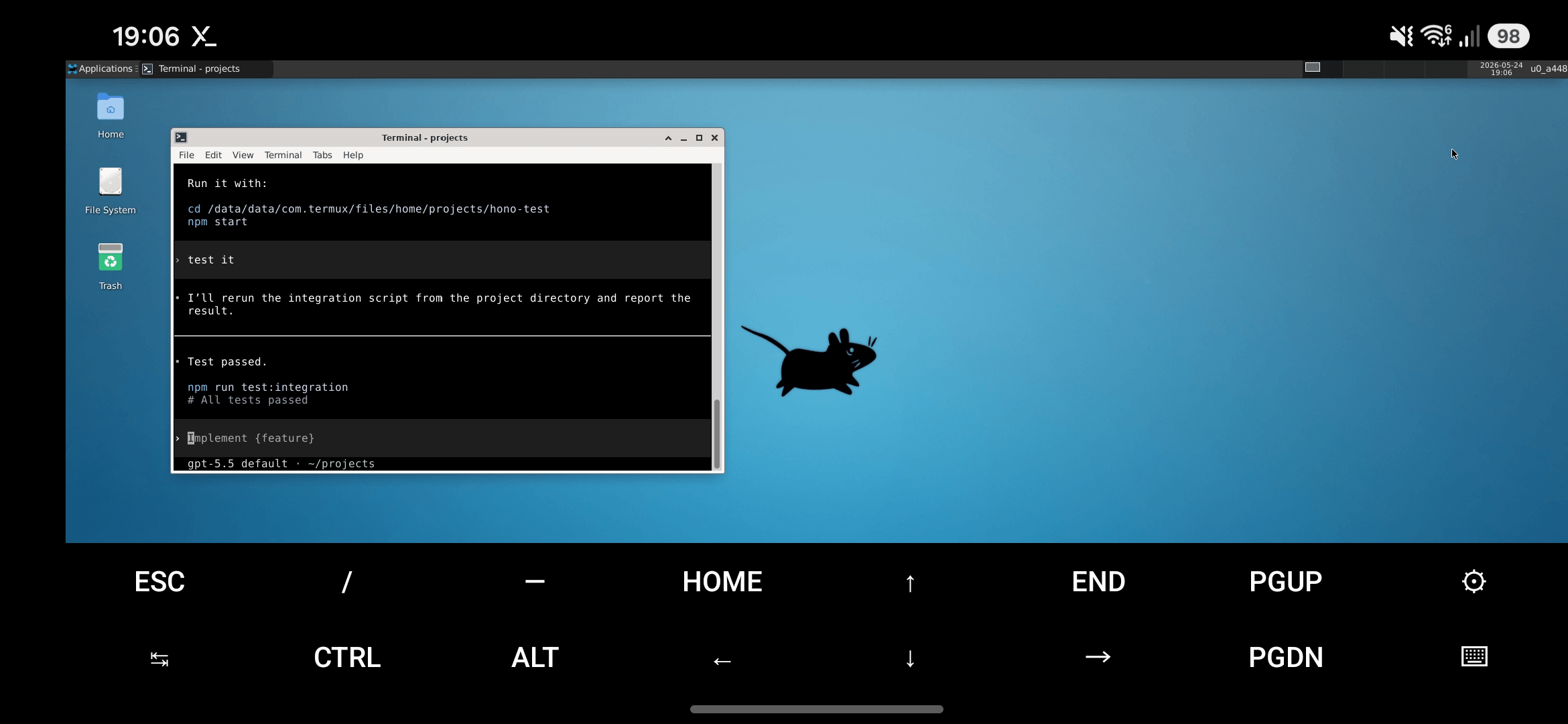
Run OpenAI Codex CLI on Android with Termux, then verify the setup by generating and testing a small Node.js Hono app. Optional Termux:X11/XFCE setup is included for Samsung DeX or desktop-style use.
The Hono server binds to 127.0.0.1:3000 for same-phone development only.
Prerequisites
- Android ARM64 phone, for example Samsung Galaxy S23
- Termux from F-Droid or GitHub
- Termux:X11 from GitHub
- Project code stored in
~/projects, not shared storage
1. Install Termux and Termux:X11
Install these Android apps:
Install both APKs.
2. Update Termux
pkg update && pkg upgrade
If mirrors fail:
termux-change-repo
pkg clean
pkg update && pkg upgrade
Choose the main repository default mirror group or all mirrors.
3. Create a Project Folder
Grant storage access so Termux can read APKs, downloads, and shared files when needed:
termux-setup-storage
mkdir -p ~/projects
Keep Node.js projects in ~/projects. Avoid /sdcard, Downloads, and shared storage for active code because Android shared storage is noexec, does not support symlinks, and can break git repos, build tools, and node_modules.
4. Optional: Run XFCE with Termux:X11
pkg install x11-repo
pkg install termux-x11-nightly xfce4 dbus
Quick start:
termux-x11 :0 -xstartup "dbus-launch --exit-with-session xfce4-session"
Reusable launcher:
cat > ~/startxfce.sh <<'EOF'
#!/data/data/com.termux/files/usr/bin/bash
pkill -f "termux-x11" 2>/dev/null
pkill -f "xfce4-session" 2>/dev/null
sleep 1
termux-x11 :0 -xstartup "dbus-launch --exit-with-session xfce4-session"
EOF

chmod +x ~/startxfce.sh
Run the launcher:
./startxfce.sh
Then open the Termux:X11 Android app. Use it directly on the phone, or open it in Samsung DeX as a desktop-style window.
5. Install Node.js in Termux
pkg install nodejs-lts git curl ripgrep
node -v
npm -v
git --version
curl --version
rg --version
6. Install OpenAI Codex CLI in Termux
The official @openai/codex package may fail in native Termux because Termux uses Android ARM64 with Bionic libc, not standard Linux ARM64 with glibc.
Install a Termux-compatible package:
npm install -g @mmmbuto/codex-cli-termux
Source/release repo for this package: DioNanos/codex-termux
codex --version
codex
Security note:
@mmmbuto/codex-cli-termuxis a community package, not the official OpenAI npm package. For sensitive code, use the official Codex CLI on Linux or macOS over SSH.
7. Create a Hono Node.js App with Codex
cd ~/projects
codex
Prompt:
Create a minimal Node.js Hono project named hono-test for Termux.

Requirements:
- Use ESM modules.
- Install hono and @hono/node-server.
- Add server.js that listens on 127.0.0.1:3000.
- Add routes:
  GET / returns plain text "Hello from Hono on Termux"
  GET /api/health returns JSON: { ok: true, time: current ISO time }
- Add npm scripts:
  start = node server.js
  dev = node --watch server.js
  test:integration = sh test.sh
- Add test.sh that checks both routes with curl.
- Install dependencies, run the integration test, and fix any failures.
- test.sh should print "All tests passed" and exit non-zero on failure.
Codex should create:
package.jsonserver.jstest.sh
8. Open the Hono Server
Open the native Android browser:
http://127.0.0.1:3000
http://127.0.0.1:3000/api/health
Or call it from Termux:
curl http://127.0.0.1:3000/
curl http://127.0.0.1:3000/api/health